- TESTED the HUD block on a fresh save and again at level 4, 2026-11-04
- IN-GAME SHOP LVL 1, the bar beside it, and the objective card
- OFFICIAL ONLY the store page mentions growing the store without numbers
- NEEDS CHECK what fills the bar, what each level unlocks, and whether levels cost money
What the client prints
The block is small and always in the same place, top-right:
- a horizontal track with a white fill, empty on a fresh save;
SHOP LVL 1printed under the track;- and, to its right, the cash figure — see the money page for that ledger.
Nothing else on screen refers to the level. There is no level-up card, no experience number, and no tooltip that we have found. If the level means something, the game makes you infer it from what changes in the shop.
What we can say about the curve
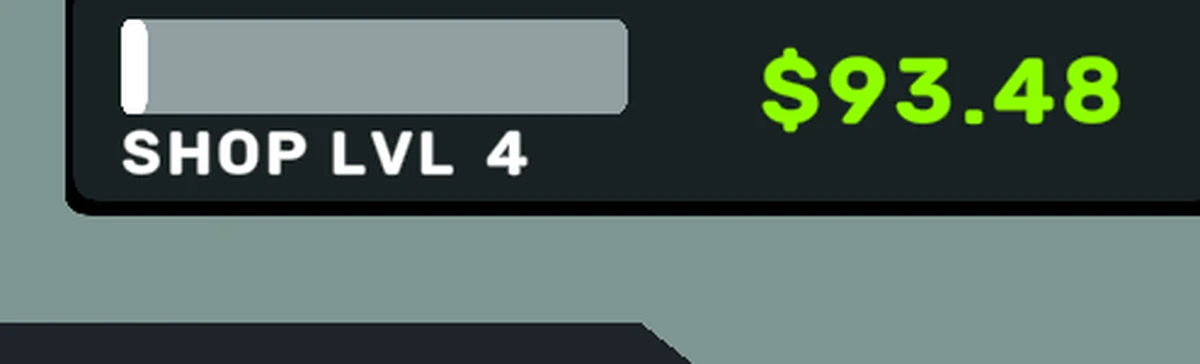
The level does move. In a later session the same save printed SHOP LVL 4
with $93.48 in cash and only a thin white sliver in the bar — under a tenth
of its track, so levelling is not
a tutorial-only artefact — it happens while you trade.
One completed sale, watched on its own, filled none of the bar that we could see. That is a single observation, not a rate, and it is the reason this page has no "XP per sale" table: we would be fitting a line to one point.
The objective card is the other half of the tutorial, and on the run we
photographed it read Checkout 2 customers. Click on …. Objectives are not
levels, but they are the only other progression text on screen, so they belong
in the same record.
What is still open
- What fills the bar. Sales, items sold, customers served, or money taken — we have not isolated a single one.
- What a level unlocks. The most likely candidates are more shelf space, more checkout lanes and new products; none of them is printed anywhere we have read, so none of them is claimed here.
- Whether levelling costs money. Nothing we have seen charges for it, and
the cash figure at level 4 (
$93.48) is larger than the starting$25.00, so the level did not come out of a purchase we could see.
When one of those is captured, this page gains a section rather than a correction — the blank stays labelled until then.
Last checked against the client: 2026-11-04 · client web build 2026-11-04