- TESTED the shift panel, the tutorial chain and the HUD, 2026-11-04
- IN-GAME the client's own labels, quoted
- OFFICIAL ONLY the portal's platform line and rating
- NEEDS CHECK the till routine, the market screen and the level curve
What this is
A shop simulator that runs in a browser tab. You walk a floor, stack shelves, watch a till and keep a shop open for a shift. The client is small enough that its rules can be read off screens instead of inferred: the shift length is printed, the starting cash is printed, and the tutorial tells you the order it wants things done in.
What we measured
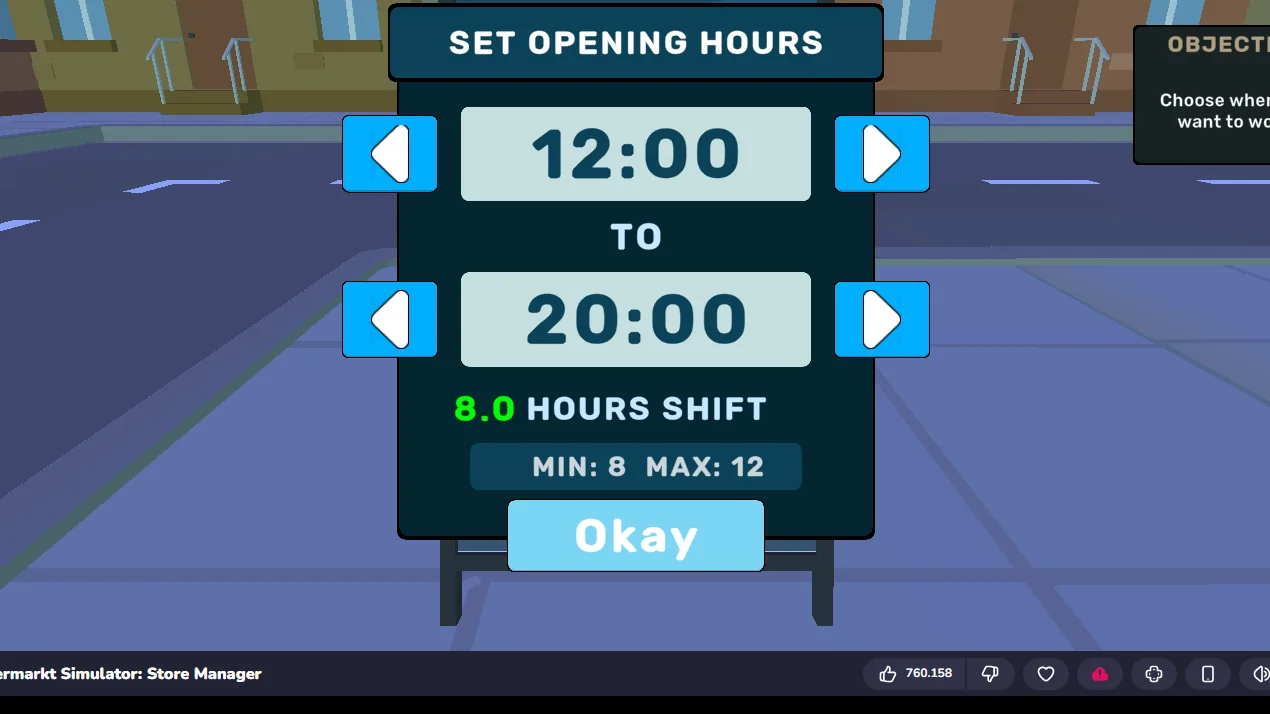
The shift panel is the clearest example. Opening the A-frame sign outside the shop prints a start time, an end time, the length of the shift and the bounds it will accept:
- the panel reads
MIN: 8 MAX: 12, so a shift is 8 to 12 hours, chosen by the player, not fixed by the game; - the default it opens with is
12:00to20:00, which is8.0 HOURS SHIFT; - the same numbers are echoed on the pavement sign as
OPEN 12:00 to 20:00, so the sign is a readout of the setting rather than decoration.
That is the kind of fact this guide is built from: printed in the client, dated, and quoted rather than paraphrased.
What we have not confirmed
Two systems are still open and are marked as such on their pages: what the till asks of you when the first customer arrives, and what the back-office computer lets you change. A guide that fills those gaps from assumption would read exactly like the pages this one is trying to be better than.
Where to start
If you have not opened the shop yet, read the shift page first: it decides how much time you have and therefore how much you can afford to spend. If you have, the stocking page is where most first shops stall.
- 🛒Start the shopWhat the first ten minutes ask of you, in the order the client asks for it.
- 🕒Shift hoursThe panel prints MIN 8 and MAX 12: how long a day lasts, and what a longer day costs you.
- 📦StockingBox on the floor,
Eto open it, click the shelf to send the goods across. - 🧾The tillWhat happens when the first customer reaches the counter.
- 💵MoneyWhere the takings come from, and the order we would spend them in.
- 🔤ReferenceThe client's own words for its own systems, quoted rather than paraphrased.
Last checked against the client: 2026-11-04 · client web build 2026-11-04